Slit-scan effect for photos, free online
In slit-scan, a picture is built from thin strips, each one taken at a different moment. Anything that moves while the strips are taken gets stretched, squeezed or bent. Snitscanner does this with your own photo: a scan line sweeps across it and copies one strip at a time, and you move the photo while it passes.
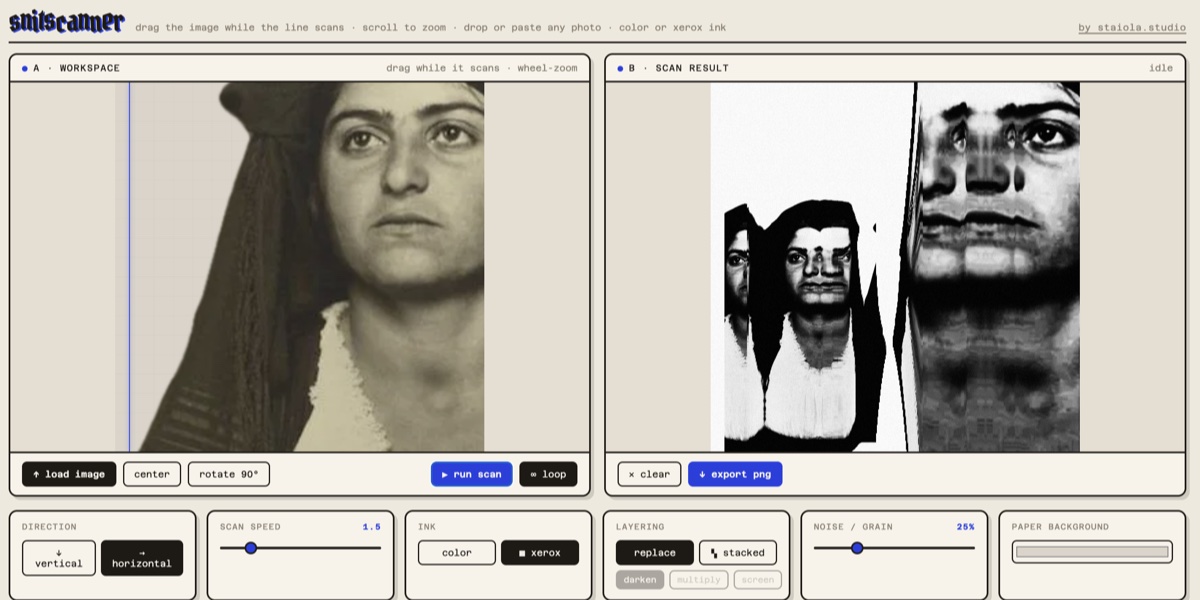
How to do it
- Drop or paste a photo, or press “load image”.
- Press “run scan”.
- Drag the photo while the line passes over it.
- Press “export png”.
What the movement does
- Move the photo along with the line and the same part is copied again and again: it stretches.
- Move it against the line and parts are skipped: it gets squeezed.
- Move it across the line and the strips land shifted: it slants or waves.
- Stop moving and that part comes out as a plain copy.
- A slower scan speed gives longer smears from the same hand movement.
The line can run top to bottom or left to right. With loop on it keeps sweeping, and each pass replaces the last or stacks on it.
The look
The result can stay in colour, or go through the photocopy inks: xerox for hard black toner, dither for a pattern of dots. Grain, paper colour, toner and dust on the glass are there if you want them. More about the xerox effect.
Limits
The browser version takes up to three images and exports a 1520 px square PNG. It works on still images, not video, and it works best on a computer.
Questions
Is it free?
Yes. The browser version is free and needs no account.
Are my photos uploaded?
No. The scan runs in your browser and the photos stay on your computer.
Can I slit-scan a video?
Not in the browser. Snitscanner for iPhone, iPad and Mac takes video files and a live camera, and on iPhone, Hand Scan uses the camera as you pan across a subject.
Do I have to use the photocopy look?
No. Choose the color ink and turn grain down to keep the photo's own colours.
Does it use AI?
No. Every strip in the result is a strip of your photo, copied where the line was at that moment.