Xerox effect for photos, free online
Snitscanner copies your photo the way a photocopier does. A scan line moves across it and lays down one thin strip at a time in hard black toner. Leave the photo still and you get a plain xerox copy. Move it while the line passes and the copy smears, stretches and repeats.
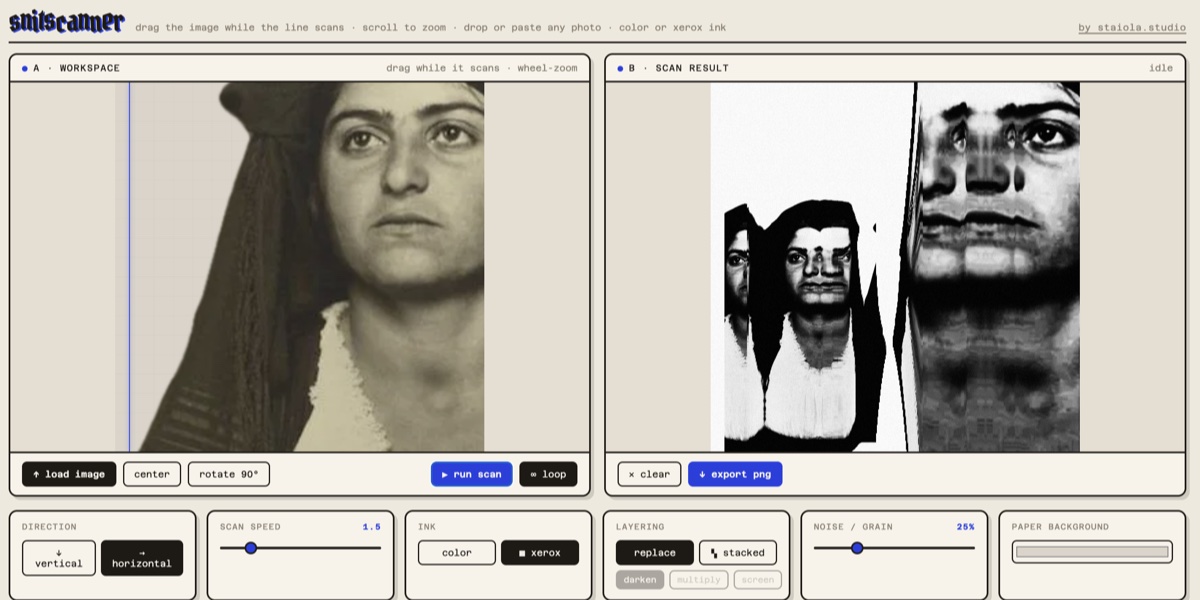
How to do it
- Drop or paste a photo, or press “load image”.
- Choose the xerox ink.
- Press “run scan”.
- Press “export png”.
What you can change
- Lighter or darker, fine or coarse
- Noise and grain
- Paper colour
- Grid, dust and toner smudges on the glass
- Layering: each pass replaces the last, or stacks with darken, multiply or screen
- Feed: the finished copy becomes the next original, a copy of a copy
- Scan direction and speed
- Two other inks: dither (black and white dots) and colour
Limits
The browser version takes up to three images and exports a 1520 px square PNG. It works on still images, not video, and it works best on a computer.
Questions
Is it free?
Yes. The browser version is free and needs no account.
Are my photos uploaded?
No. The scan runs in your browser and the photos stay on your computer.
Does it work on video?
Not in the browser. Snitscanner for iPhone, iPad and Mac takes video files and a live camera.
How is it different from a xerox filter?
A filter changes the whole picture in one step. Here the picture is copied strip by strip, and you can move it while that happens, so the smears come from your hand. If you only want the look, keep the photo still.
Does it use AI?
No. The copy is your photo, strip by strip, plus the grain, dust and toner you switch on.
Can I get a larger file?
The browser exports 1520 px. The Mac app goes up to 8000 px, with print sizes at 150, 300 or 600 dpi. The iPhone and iPad app goes up to 4096 px.
Is there an app?
Yes, for iPhone, iPad and Mac, on the App Store. Everything works for 7 days. After that, exports carry a “trial” mark until you unlock it with a one-time purchase. No subscription. One purchase covers all three.